AGNTCY

Clarity

Ensure the system is always explainable and visible

The "Clarity" principle focuses on surfacing the reasoning, context, and confidence behind every agent output.
Rather than letting AI feel like a black box, Clarity ensures users can understand how and why an agent came to its conclusion—both at a glance and through deeper inspection. This enhances transparency, supports critical thinking, and calibrates trust.
User Expectations
Understand the logic and rules used by the agent.
See alternative paths or decisions the agent considered.
Interpret the agent's level of certainty and act accordingly.
Explore linked evidence or sources that underpin the output.
Control isn't just a safeguard—it's a trust-building mechanism. When users know they can set the rules, they're more likely to explore and partner with intelligent agents confidently.
Example Patterns
Action Log
Action Log
Real-time feed of decisions with timestamps and brief reasons.
Confidence Meter
Confidence Meter
Certainty visualizations—numerical, bar-based, or color-coded.
Sources
Sources
Inline or expandable citations showing where information came from.
Alternatives View
Alternatives View
Displays skipped paths and justifies why the current one was chosen.
Rationale Bubbles
Rationale Bubbles
Inline tooltips or side notes that explain, "I did this because..."
These patterns can appear in dashboards, summaries, assistant popups, and side panels. They help users validate agent behavior, detect errors early, and build deeper mental models of how the system works.
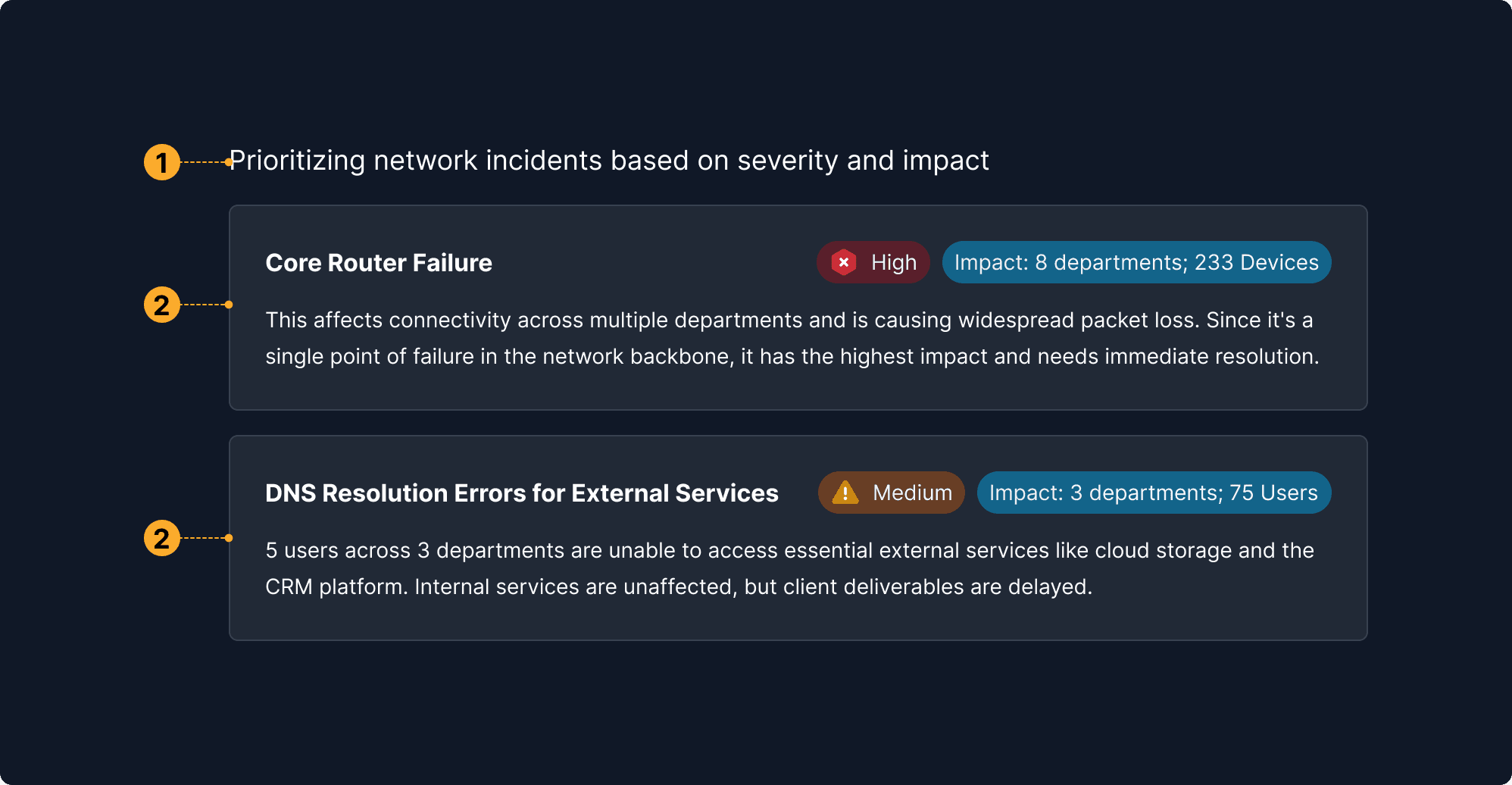
Inline Rationale
This encourages agents to articulate why they made a recommendation or decision. Rationale should be accessible, understandable, and relevant, enabling users to make sense of the agent's thinking.
Inline Rationale
1

Suggested Action Cards

Lets users choose the intelligence level and cost, putting control over the AI’s “power” directly in their hands.

2

Tags

Fine-tunes the agent's behavioral flexibility—from creative to precise—giving nuanced control over outputs.

3

Action Context

Encourages exploration at the user's pace—only reveals complexity when the user is ready for it.
What It Means
Communicate logic behind every decision in user-friendly language.
Why It Matters
Helps users assess relevance, catch errors, and learn how the system thinks.
When to Use This Principle
For tasks like content creation, decision-making, prioritization—especially where the user might question the outcome.
What it Looks Like in Action
A recommendation engine displays: “These leads are prioritized based on engagement score and deal stage.” A clickable tooltip expands into the scoring formula.
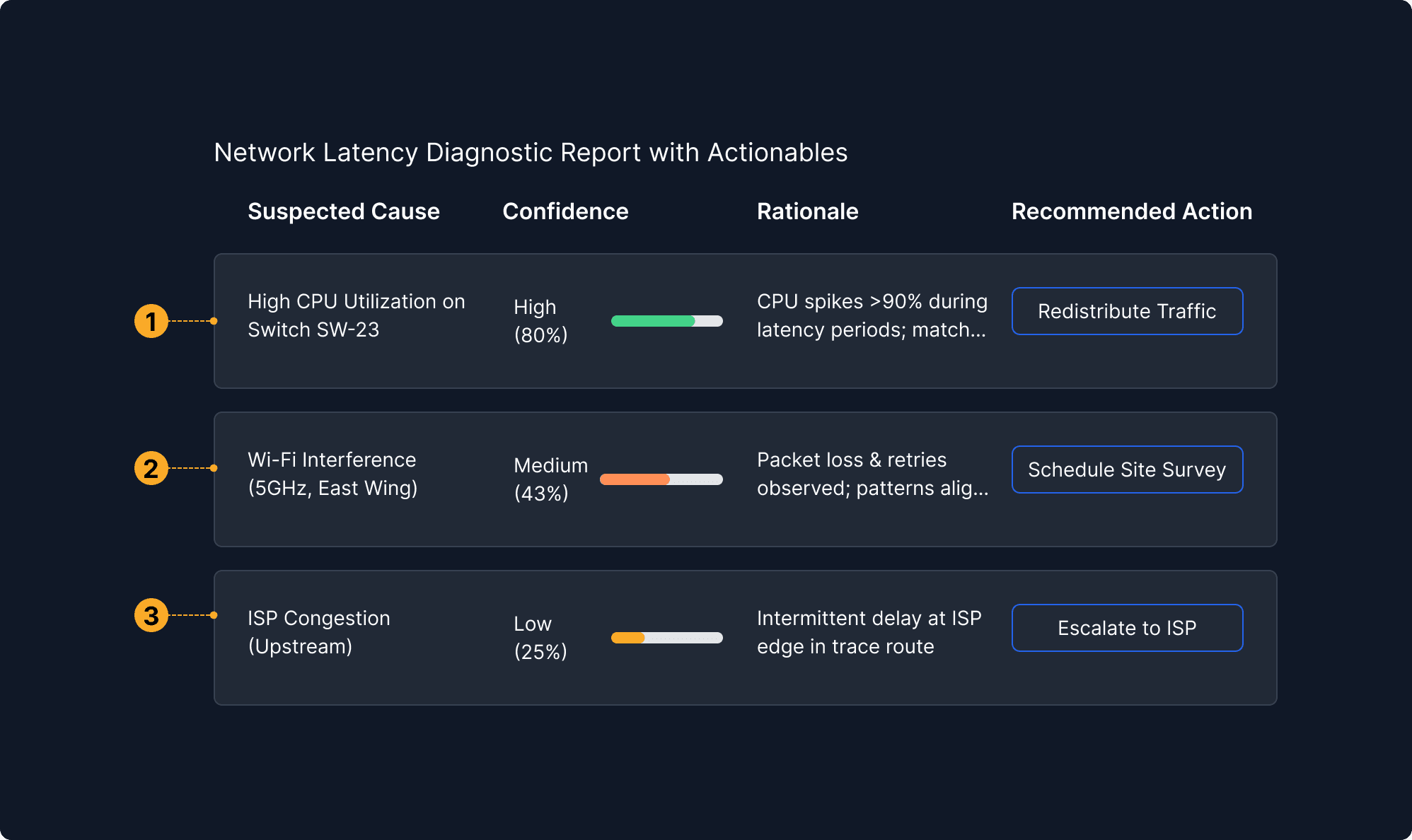
Confidence & Uncertainty Displays
By disclosing confidence levels or uncertainty, agents help users interpret outcomes more effectively and calibrate trust appropriately. This principle is key for transparent decision support.
Confidence & Uncertainty Displays
1

Status Indicators

Displays key network metrics (bandwidth, latency, packet loss) but does not provide confidence intervals or uncertainty information to support trust calibration.

2

Performance Trends

Shows historical and real-time trends of network metrics but lacks visual cues for data variability, measurement error, or forecast confidence.

3

Decision Logs

Records past actions and their outcomes but omits any expression of confidence or uncertainty about the effectiveness or reliability of those actions.

4

Decision Support

Offers recommended actions and simulations but fails to communicate the likelihood of success, risks, or uncertainty associated with those suggestions.

5

Custom Interaction

Enables user-defined commands without providing feedback on the confidence, risk, or expected impact variability of those custom actions.
What It Means
Visibly indicate the system’s level of certainty for outputs.
Why It Matters
Builds appropriate reliance and helps users interpret outputs critically.
When to Use This Principle
For analytics, forecasting, predictions, diagnostics, risk scores, or when the agent is making educated guesses.
What it Looks Like in Action
An AI assistant summarizes an email thread and displays a "Confidence: Medium" tag. A color-coded bar visual (yellow, not green) helps users visually recognize caution.
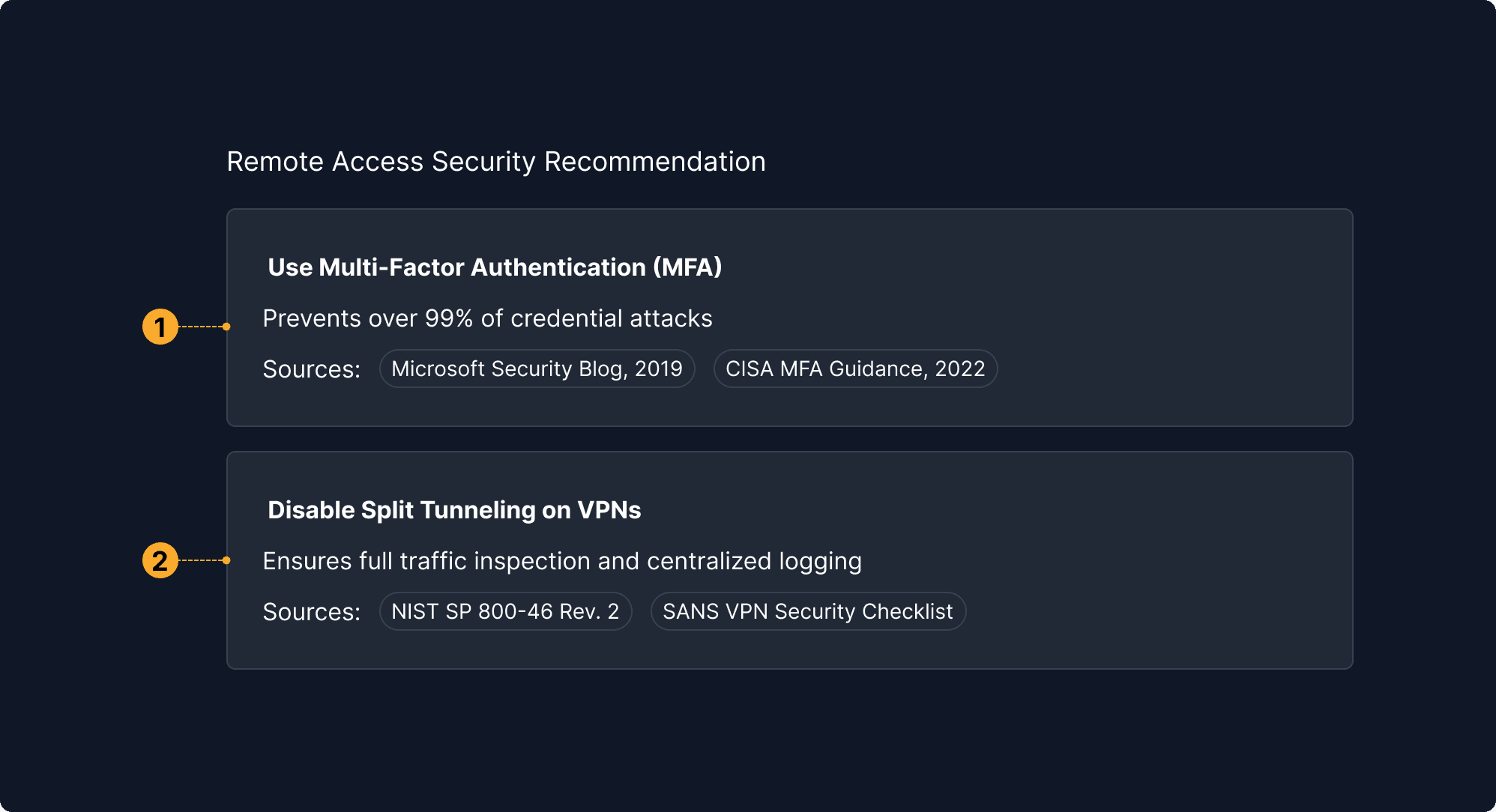
Source Attribution
Source attribution helps users verify and contextualize outputs by revealing where information came from. This supports accountability and enables further inquiry.
Source Attribution
1

Summary & Context

Provides a concise overview of the source of the problem, explaining what happened, where it happened, and what impact resulted. Helps users quickly verify the core source information behind the error.

2

Event & Time Tracking

Offers a detailed, timestamped sequence of source events leading to the error. Enables precise traceability and validation of when and how the problem originated and evolved.

3

Accountability & User Context

Identifies who is involved and which organization is responsible or reviewing, supporting accountability and giving provenance to the interaction with the data.
What It Means
Cite data, sources, or models used for a given decision or content block.
Why It Matters
Empowers verification, enables learning, and supports transparency.
When to Use This Principle
In research tools, summarization agents, legal/medical writing, or content-generating models.
What it Looks Like in Action
A paragraph generated by an AI research tool includes superscript links like “[1]” which, when clicked, show the document name, date, and section used to generate that portion.
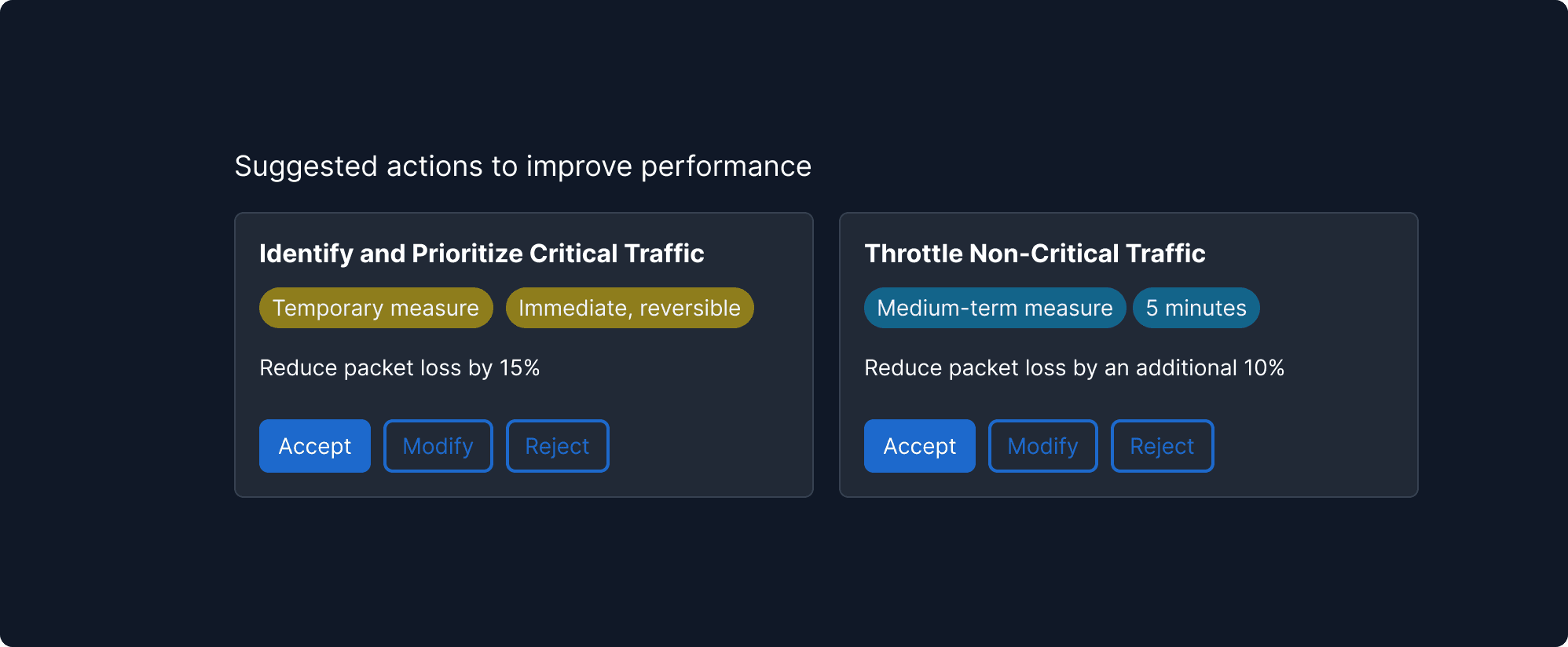
Alternatives & Trade-Offs
Showing what the agent didn’t choose—and why—helps users understand trade-offs. It creates transparency and supports participatory decision-making.
Alternatives & Trade-Offs
1

Summary & Context

Provides a concise overview of the source of the problem, explaining what happened, where it happened, and what impact resulted. Helps users quickly verify the core source information behind the error.

2

Event & Time Tracking

Offers a detailed, timestamped sequence of source events leading to the error. Enables precise traceability and validation of when and how the problem originated and evolved.

3

Accountability & User Context

Identifies who is involved and which organization is responsible or reviewing, supporting accountability and giving provenance to the interaction with the data.

What It Means
Reveal other options the agent considered and explain why they were dismissed.
Why It Matters
Encourages user agency and builds deeper understanding of agent behavior.
When to Use This Principle
In multi-path decisions—planning, design generation, route selection, or strategic recommendations.
What it Looks Like in Action
A trip planner shows three itineraries: "Shortest (5 hrs), Scenic (6.5 hrs), Easiest (7 hrs)." It selects the scenic route by default and says, “Chosen for fewer transfers and high ratings.”